

- Creating the transaction
- Sending the command
- Verifying the payment
Setup
Payments are executed on-chain, so you’ll need an Ethereum compatible wallet. Next, whitelist the address in the Developer Portal. Whitelisting adds security to your mini app to prevent payments from being sent to an unauthorized addresses. Optionally you can disable this check in the Developer Portal.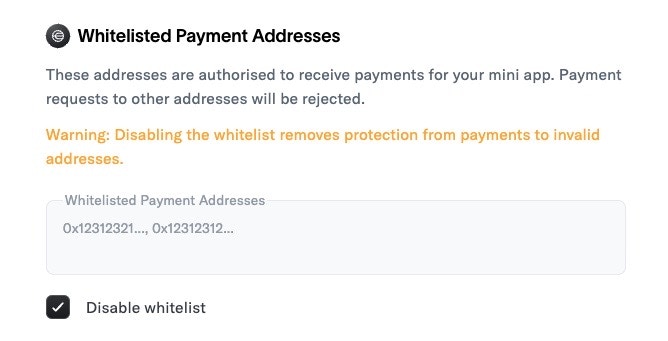
Initiating the payment
For security, it’s important you initialize and store your payment operation in the backend.app/api/initiate-pay/route.ts
Using the command
- Async handlers
- Event listeners
Sending the command & handling the response
We currently support WLD and USDC payments on Worldchain. Below is the expected input for the Pay command. Since World App sponsors the gas fee, there is a minimum transfer amount of $0.1 for all tokens.PayCommandInput
app/page.tsx
Verifying the payment
There are two ways to verify a payment:- Developer Portal API: Call our API to get the current status of the transaction. Since payments are executed on-chain, it can take up to a few minutes to confirm. You can choose to optimistically accept the payments once they’ve landed on-chain, or poll the endpoint to wait until it’s successfully mined.
- On-chain verification (advanced): Verify payments by inspecting the ERC-4337
UserOperationEventemitted during the pay operation.
Developer Portal API
Use the Get Transaction endpoint to get the current status of the transaction. When the transaction has landed on-chain, thetransaction_status will be mined.
app/confirm-payment/route.ts
On-chain verification (advanced)
Verify payments by inspecting the ERC-4337UserOperationEvent emitted during the pay operation.
The
TransferReference event will no longer be emitted. Instead, the reference string is encoded in the nonceKey of the UserOperationEvent as described below.reference and miniappId into the nonceKey of the UserOperationEvent, allowing you to verify the payment on-chain.
How it works
TheUserOperationEvent nonce is a 32-byte value split into two parts:
- Nonce key (top 24 bytes): contains your payment identifiers
- Nonce sequence (bottom 8 bytes): a counter
nonceKey is constructed as:
- 1 byte: version (currently 1)
- 13 bytes: truncated SHA-256 hash of your
miniappId - 10 bytes: truncated SHA-256 hash of your
reference(the unique ID you passed inPayCommandInput.reference)
UserOperationEvent logs for the sender address. Find the matching event by comparing the embedded bytes in the nonceKey with the expected bytes.